Working with real APIs
Monorepos, specs without operationIds, big APIs, and keeping descriptions human.
Monorepos
Run from the repo root. The CLI finds the spec and the web app on its own:
npx @webmcp-stack/codegen generateDetection reads each workspace package's package.json and looks for a browser framework
(next, react + vite, nuxt, @sveltejs/kit). With exactly one candidate it proceeds
and says what it decided (Found your web app: apps/web (next)). With several, it asks
once and remembers the answer in .webmcp-codegen.json. Override either with --spec and
--out.
The tools land in the web app (apps/web/src/webmcp), because tools are browser code. The
spec's location plays no role in placement.
Specs without operationIds
Names fall back to method plus path: GET /v1/trips/{id} becomes get-v1-trips-id. Two
automatic cleanups keep those readable:
- A shared version prefix is stripped. When nearly every path starts with
/v1/, names becomeget-trips-id, with a note in the report. - Collisions append the method or a counter, and every rename shows up in the audit.
For the best names and descriptions, add operationId and summary to your spec at the
source. It improves your SDK generation too, not just this tool.
Big APIs
A 200-endpoint API generates 200 tools. That works, but context matters: every tool's
description joins the agent's prompt. Better to expose the endpoints agents should
actually use. Use safety.exclude in the config for whole families (["internal", "debug"]), and the dashboard's toggles for individual calls.
Seeing your tools
The generated tools register on page load. To watch that happen:
- Chrome: turn on
chrome://flags/#enable-webmcp-testing(Chrome 146+) and reload. The Model Context Tool Inspector extension shows the registered tools and lets you invoke them by hand. - Other browsers: add the WebMCP polyfill to your page; the same registration code works unchanged.
- No browser at all:
npx @webmcp-stack/codegen devruns any tool directly from the dashboard (server-side, so without your browser session; auth'd endpoints will answer accordingly).
The dashboard
npx @webmcp-stack/codegen dev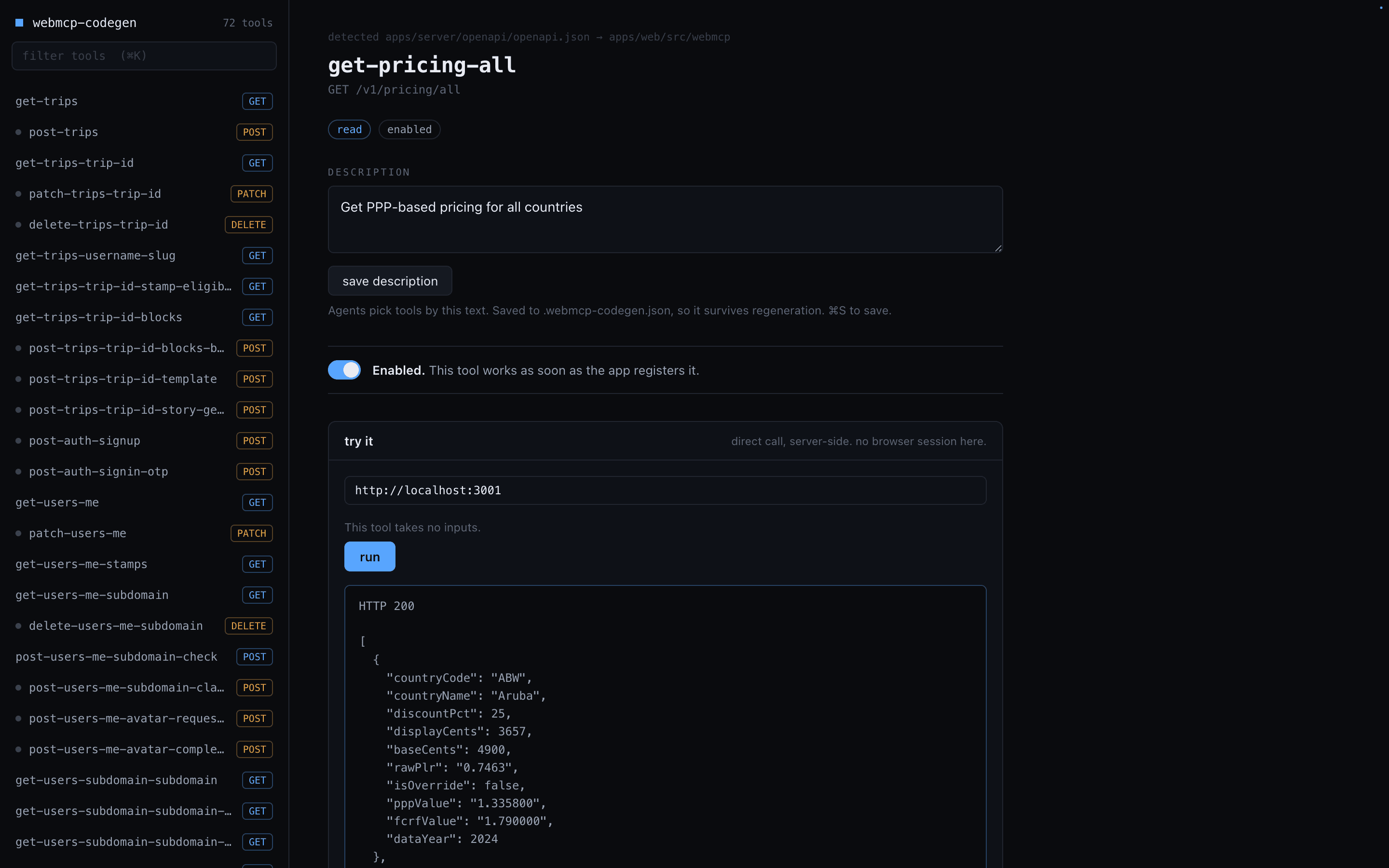
A local control panel for the generated tools: browse and search them grouped by risk
level, see each one's route and audit findings, edit descriptions, toggle tools on and
off, and run them directly. Edits are written to .webmcp-codegen.json as overrides, so
they survive regeneration and can be committed. The dashboard never touches your app: it
is a localhost page served by the CLI, gone when you Ctrl+C.
CI
The audit exits non-zero on errors, which makes it a CI check:
npx @webmcp-stack/codegen generate --dry-runRun it on pull requests that touch the spec. A new destructive endpoint, a description that tries to instruct the agent, a response that starts leaking PII: all three show up as findings before they ship.